TradeLinkOne Portal
tradeLinkOne Portal
Secure cloud portal for shipment documents, status, and smart routing.
TradeLinkOne (TLO) is a powerful cloud-based portal. Its primary function is to display all order information regarding a customer’s shipment. It contains shipment information such as the Buyer’s purchase order, Supplier’s packing list, commercial invoice, packing and shipment status. TLO also has a smart routing methodology built into it to route all of these trade documents and statuses to any customer’s supply chain partners, in the partner’s formats. Behind the scenes, TradeLinkOne allows all supply chain trading partners to create, send, receive, negotiate, acknowledge, and display the electronic business documents and shipment information securely. TLO comes complete with dashboards, reports and smart email alerts. Lastly, many TLO packing and shipping workflows, along with decision support tools are cloud-based allowing for user flexibility and maximum ease of use.
Benefits
TradeLinkOne helps supply chain teams reduce manual work, improve visibility, and collaborate securely with partners across the globe.
Greater Visibility
Gain real-time access to purchase orders, packing lists, invoices, shipment statuses, WIP, and raw-material information from one secure cloud portal, giving teams complete visibility across every shipment and trading partner.
Faster Collaboration
Automatically route trade documents and shipment updates to buyers, suppliers, and logistics partners in their preferred formats, reducing manual emails, delays, errors, and repetitive administrative work across the supply chain.
Stronger Control
Use dashboards, reports, smart email alerts, and decision-support workflows to monitor performance, identify exceptions early, and make faster, better-informed decisions that improve shipment outcomes and supply chain efficiency.
How It Works
TradeLinkOne centralizes purchase orders, packing lists, invoices, and shipment statuses in one secure cloud portal. It routes documents to supply chain partners in their required formats, provides real-time visibility, WIP and raw-material tracking, dashboards, reports, and smart alerts—enabling faster, paperless, and more connected global trade operations.
Customized to Buyers’ requirements and includes Routing Methodology
Exchanges trade documents through the internet or Value Added Networks (VAN) with security
System flow follows the physical flow of shipping information
Data can be shared and accessed by all supply chain partners
Documents display in different formats (HTML, PDF), which can be printed and served as a legal copy
WIP production milestone tracking
Global Coverage
TradeLinkOne supports businesses worldwide with country-specific trade documentation, shipment visibility, and secure collaboration across global supply chain partners










Measurable Supply Chain Performance
Track shipment visibility, document accuracy, partner connectivity, and on-time performance in one secure portal—empowering teams with real-time insights, smarter decisions, and proactive alerts across every supply chain partner.
Connected Trade Documentation
See Every Shipment. Share Every Document
TradeLinkOne securely creates, exchanges, and routes purchase orders, packing lists, invoices, and shipment statuses—delivering each document to supply chain partners in their preferred format.



Designed for Smarter Global Trade
TradeLinkOne combines an intuitive cloud portal with powerful document routing, shipment visibility, and partner collaboration—helping supply chain teams work faster, reduce errors, and stay connected worldwide.

The secret of success
Complete shipment visibility
TradeLinkOne consolidates purchase orders, packing lists, invoices, and shipment statuses into one secure, real-time cloud portal.
Seamless partner collaboration
Smart routing delivers trade documents and updates to every supply chain partner in their preferred format, securely and automatically.
Frequently asked questions
Google Chrome (version 37+ Only), Microsoft Edge (version 12+ Only), Mozilla Firefox (version 28+ Only), Safari (version 9+ Only for MacOS)
To change your password, go to “My Account” > “Settings” section and click Change Password.
Type your current password and new password.
Password Tips – Choose a smart password: Use a password with a mix of letters, numbers, and symbols.
To enhance the system security, please change your password regularly.
There is a new search tool in the Web Portal. You can try to start with a simple search by entering the keywords like PO Number in the search box
Learn a few tips and tricks to help you easily find information on the portal
Plans Built Around Your Business
Our pricing is tailored to your business model and requirements, with flexible options including subscription plans, per-transaction charges, and optional add-ons.
Essential
Ideal for businesses starting with core shipment visibility, document exchange, and secure collaboration with key supply chain partners.
Professional
Designed for growing operations needing advanced workflows, reporting, alerts, and broader connectivity across suppliers and logistics partners.
Enterprise
Built for complex global supply chains requiring custom integrations, scalable transaction volumes, dedicated support, and tailored configuration options.
our social Contact information
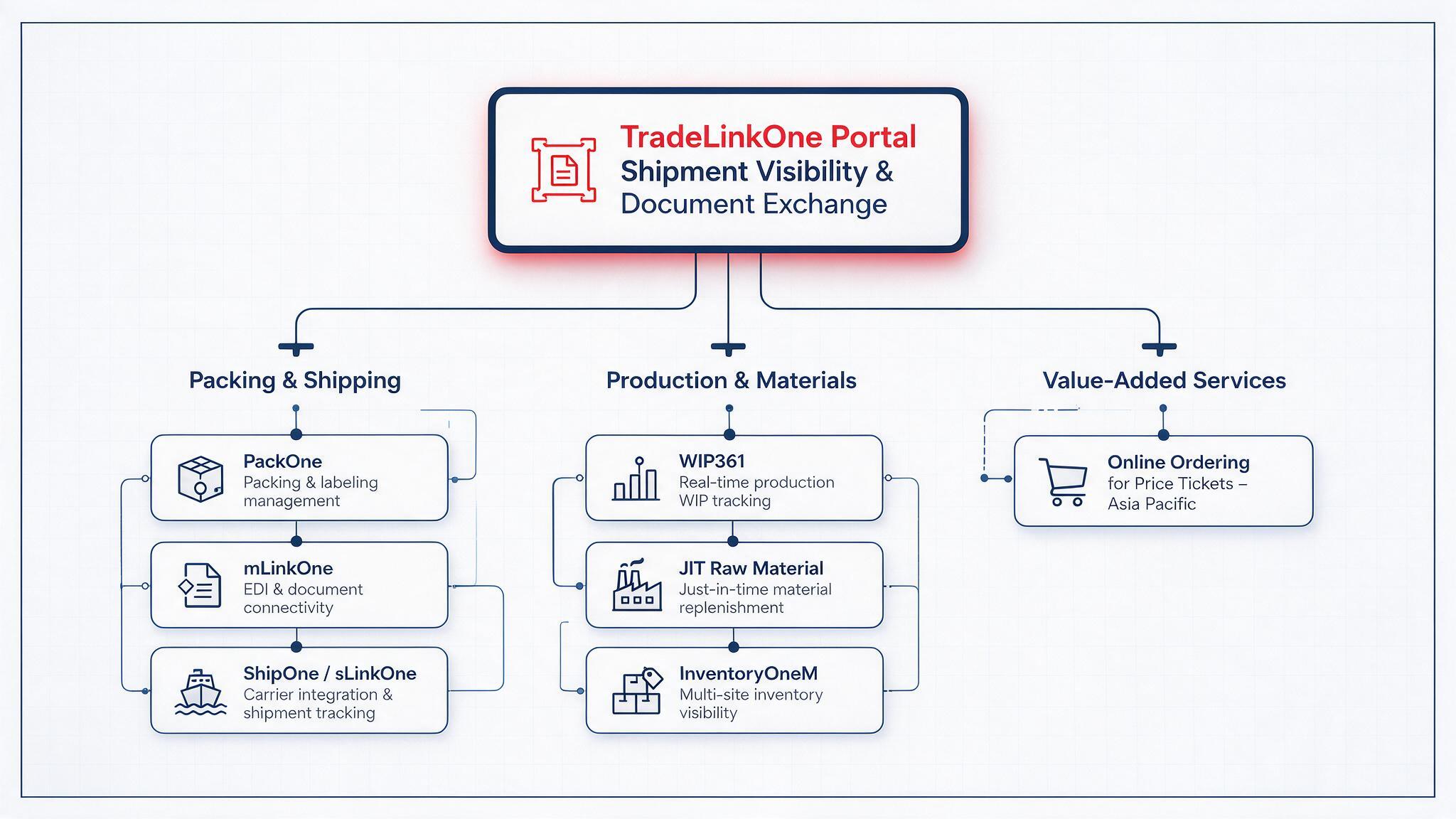
Complete Your Supply Chain Ecosystem
TradeLinkOne Portal works alongside specialized applications for packing, shipping, production, materials, and inventory—creating one connected digital supply chain.